Pages

Tuesday, March 29, 2011

Control class’ access: Access Modifiers and Proprieties

   If you are hosting a party in your house, how many people can access your house? Only the ones you invite, and how many people will be allowed to go to the second floor? Only you and your family!
   The same thing exist in development world, some times we just don’t want others to access our methods, so we protect them with an Access Modifier.
    It exist 3 type of access modifiers:
Public: The type or member can be accessed by any other code in the same assembly or another assembly that references it.
Protected: The type or member can be accessed only by code in the same class or struct, or in a class that is derived from that class.
Private: The type or member can be accessed only by code in the same class or struct.
Internal : The type or member can be accessed by any code in the same assembly, but not from another assembly.
  Let’s see how we implements them:
   // public class:
public class Car {
// protected method:
protected void Run(){ }
// private field: private
int wheels = 4;
// protected internal property:
protected internal int Wheels { get { return wheels; } } }
  No, any other type can create an instant of our Car, but only types deriving from the Car or the Car it self can start the engine. Our Wheels variable is private, no one can access it except the Car itself so we prevent the others from modifying it’s value, for example any one can change it to 10 or 20 and it won’t be a valid car! But what if we want to see how many wheels does our classes? We simply create a Property field that is read-only.
   Properties are pretty easy to use, you just declare like a variable but you define a Get and Set methods for it (or just one, that depends on the scenario) , the getter will return the value of the variable we want, and the setter will set it’s value!
  private int energy=100;
  public int Energy {get{return energy;}
set{if(value=<100){energy=value}}};
   Now we have an energy field, that can’t be more than 100, what we did, we wrote a property that will check if the value is less or equal to 100 it will change the energy variable, otherwise nothing happens. (we used an If clause, we will explain it in an other tutorial).

Understanding the OOP

   In our first application, you saw that we introduced Classes and Constructors, now this is a part of the Object-Oriented Programming where we program using Objects, that’s makes it easy for us to code and add a better business logic to your application, C# is a OOP compliant language, and supports it very well.
    OOP is a programming paradigm using "objects" – data structures consisting of data fields and methods together with their interactions – to design applications and computer programs.
An object-oriented program will usually contain different types of objects, each type corresponding to a particular kind of complex data to be managed or perhaps to a real-world object or concept such as a customer, an order, or a car.
   Fundamental concepts and features:
   Class: A class is a template for an object, a user-defined data type that contains variables, properties of an object. A class defines abstract characteristics of a thing (object), including its characteristics (its attributes, fields or properties) and the things it can do (behaviors, methods, operations or features). One might say that a class is a blueprint or factory that describes the nature of something. For example, the class Dog would consist of traits shared by all dogs, such as breed and fur color (characteristics), and the ability to bark and sit (behaviors). Classes provide modularity and structure in an object-oriented computer program. A class should typically be recognizable to a non-programmer familiar with the problem domain, meaning that the characteristics of the class should make sense in context. Also, the code for a class should be relatively self-contained (generally using encapsulation). Collectively, the properties and methods defined by a class are called members.
   Instance: One can have an instance of a class; the instance is the actual object created at run-time. In programmer vernacular, the Lassie object is an instance of the Dog class. The set of values of the attributes of a particular object is called its state. The object consists of state and the behavior that's defined in the object's classes.
   Method: A method is a set of procedural statements for achieving the desired result. It performs different kinds of operations on different data types. In a programming language, methods (sometimes referred to as "functions") are verbs. Lassie, being a Dog, has the ability to bark. So bark() is one of Lassie's methods. She may have other methods as well, for example sit() or eat() or walk() or save(Timmy). Within the program, using a method usually affects only one particular object; all Dogs can bark, but you need only one particular dog to do the barking.
   Abstraction: Abstraction means grouping the common behaviors. Abstraction refers to the act of representing essential features without including the background details or explanations. Classes use the concept of abstraction and are defined as a list of abstract attributes.
   Encapsulation: Encapsulation conceals the functional details of a class from objects that send messages to it. For example, the Dog class has a bark() method variable, data. The code for the bark() method defines exactly how a bark happens (e.g., by inhale() and then exhale(), at a particular pitch and volume). Timmy, Lassie's friend, however, does not need to know exactly how she barks. Encapsulation is achieved by specifying which classes may use the members of an object. The result is that each object exposes to any class a certain interface — those members accessible to that class. The reason for encapsulation is to prevent clients of an interface from depending on those parts of the implementation that are likely to change in the future, thereby allowing those changes to be made more easily, that is, without changes to clients. For example, an interface can ensure that puppies can only be added to an object of the class Dog by code in that class. Members are often specified as public, protected or private, determining whether they are available to all classes, sub-classes or only the defining class. Some languages go further: Java uses the default access modifier to restrict access also to classes in the same package, C# and VB.NET reserve some members to classes in the same assembly using keywords internal (C#) or Friend (VB.NET). Eiffel and C++ allow one to specify which classes may access any member.
   Inheritance: Inheritance allows the programmer to treat derived class members just like their parent class's members. This type of relationship is called child-Parent or is-a relationship. "Subclasses" are more specialized versions of a class, which inherit attributes and behaviors from their parent classes, and can introduce their own. For example, the class Dog might have sub-classes called Collie, Chihuahua, and GoldenRetriever. In this case, Lassie would be an instance of the Collie subclass. Suppose the Dog class defines a method called bark() and a property called furColor. Each of its sub-classes (Collie, Chihuahua, and GoldenRetriever) will inherit these members, meaning that the programmer only needs to write the code for them once.
Each subclass can alter its inherited traits. For example, the Collie subclass might specify that the default furColor for a collie is brown-and-white. The Chihuahua subclass might specify that the bark() method produces a high pitch by default. Subclasses can also add new members. The Chihuahua subclass could add a method called tremble(). So an individual chihuahua instance would use a high-pitched bark() from the Chihuahua subclass, which in turn inherited the usual bark() from Dog. The chihuahua object would also have the tremble() method, but Lassie would not, because she is a Collie, not a Chihuahua. In fact, inheritance is an "a… is a" relationship between classes, while instantiation is an "is a" relationship between an object and a class: a Collie is a Dog ("a… is a"), but Lassie is a Collie ("is a"). Thus, the object named Lassie has the methods from both classes Collie and Dog.
(Definitions from Wikipedia)

Monday, March 28, 2011

Visual Studio C# Express 2010: Your first application!


   To write C# applications you need an integrated development environment (IDE), there is lot of them, like Monodevelop, Charpdevolop, and Visual Studio.
   The best one is Visual Studio, it’s from Microsoft and provides full support for the .NET Framework and Microsoft Platform.
   Visual Studio 2010 is the latest version, it will costs you around 549$ (more information here) , but Microsoft have a free edition for educational purpose, named Visual C# Express which you can download for free along with other Express products, and it’s the one we are going to use.
   Exploring Visual C# Express 2010: Creating a simple application:
    After you finished the download, just follow the steps on the setup screen, it’s an easy step (If you don’t know how to setup an application, so there is no need to learn development!) and we won’t discuss.
   Now, open the Visual C# and let’s create a new Windows Application, click the Create Project then select Console Application, choose a name (MyFirstApp for example) and click OK.
3-27-2011 1-53-56 PM
   As you can see, the IDE has created a file for you: program.cs, There is one thing you have to understand, the C# compiler will look for a method named Main() in a file named program.cs, it’s the main method in your application that you must have in your program, otherwise, you will get an error.
   So let’s start coding a simple “Hello World” application. In the Main() method write: Console.WriteLine(“Hello World!”); 
3-28-2011 2-11-30 PM 
   Let’s execute it and see the result, just click the green arrow or press F5.
   3-28-2011 2-15-29 PM


   Funny no? You just wrote an application!
   Now let’s understand what we did, first we asked a pretty lady named Console for a service that she can do for us, we asked her to write something for us in the screen, so she said “ok,give me the sentence” and we gave her Hello World.
   The pretty lady is a class, shown in sky blue color, we asked her to do us the service by calling an existing method that she exposes called WriteLine,and we told her about our sentence by passing it via parameters
  So, you might ask: “Cool, can I create a pretty lady that can calculate numbers?” sure! do want to see a demo? so let’s create a new class file named: Calculator.cs.
3-28-2011 2-22-42 PM
   Now you have a new file which can contains classes, Visual C# has created for us one class named: MyCalculator,but you can create as much as you want in one single file!
   Ok, until now, our class stands for nothing, so let’s make it useful and add some code; First, declare a method named Add, that accept two parameters and return a variable of type int (integer).
public int Add(int n1, int n2)
        {
            int result = n1 + n2;
            return result;
        }
3-28-2011 2-31-45 PM
  Now, we have our genius lady that can calculate! Let’s ask here for a service!
  Go back to our first file program.cs and add the following code in the Main method:
MyCalculator MyGeniusLady = new MyCalculator();
            int result = MyGeniusLady.Add(5, 6);
            Console.WriteLine("5 + 6 = " + result);
            Console.ReadKey();
3-28-2011 2-36-41 PM
   Let’s execute our program and see the result!
3-28-2011 2-38-09 PM
   Wow! Brilliant no? So what just happened? Let’s explain:
   First, we wrote a method that takes 2 parameters, work with them then return the result as a variable of type Int (return result;). Once the return keyword (In Visual C#, keywords are colored with blue) is reached by the JIT the methods ends, so any thing you write after this word has been reached won’t be executed!
   In our method we used variables which are places in the memory where we can put our data temporally, all our variables will despair once our program exits, so we can use them only to store user input temporally.
   Now, we are going to extend our program so it takes user input and work with it rather than our 5 and 6! We need just to modify the code in Main() so it looks like this one:
static void Main(string[] args)
        {
            MyCalculator MyGeniusLady = new MyCalculator();           
            int result = MyGeniusLady.Add(5, 6);
            Console.Write("Please enter the first number A: ");
            int A = Console.Read();
            Console.Write("Please enter the first number B: ");
            int B = Console.Read();
            Console.WriteLine(MyGeniusLady.Add(A,B));
            Console.ReadKey();
        }
3-28-2011 2-50-54 PM
   Now Test It!
3-28-2011 2-56-18 PM
   What have we done is: we took the user input with the ReadLine() method which returns a String and converted it to Int with the Parse() method and then we assigned it to our variable; You can also see that we wrote this: Console.WriteLine(MyGeniusLady.Add(A,B)); because our method return an Int, we can simply just pass it to the WriteLine method! this has the same result as in the previous example but we just did it in a deferent way!
  Notice: you see the ReadKey() method at the end of the method, we just you it to prevent the console from automatically closing after showing the result. Remove it and test!
   You may ask: “Wait a moment! My lady is not like the Console lady! I had to write more code to ask her to give me some results!” The answer is simple! The console class is static , that means you can call her directly without the need of assigning a variable with a reference to a new instance, Our class is not static, we can create as many variables as we want! But you can always make you class static by adding the static keyword after the public keyword. (Static classes will be discussed in another lesson!)
   This is all for today, Try to understand it! If you need more information about Classes, Console, Methods… etc. please refer to the MSDN Web Site.

Saturday, March 26, 2011

Getting deeper into .NET: Part II


The .NET main components:
  As you can see in the next picture, the .NET framework offers a lot of features, ADO.NET, LINQ, WPF etc..
  In every new version Microsoft introduced new components, we are now going to explain every component of those components from the main version (2.0) to the latest available one (4.0).
  Framework 2.0:
  This version is the version that Microsoft built the other version on (except 4.0 that has a new engine), The basic .NET components were introduced in Framework 2.0 which are:
  1. The CLR: Already explained.
   2. The BCL: Already explained.
   3. WinForms: It’s the NET’s graphical application programming interface, it is built on the extant Windows API and some controls merely wrap underlying Windows components and allows you to develop Windows Applications (Visual Studio 2008 for example).
   4. ASP.NET: it is a web application framework that allows you to create rich and dynamic web sites and web services (Microsoft.com for example) and is the successor to the classic ASP.
   5. ADO.NET : it’s a set of components that programmers can use to access data and data services, you can connect to a database, get and set data, open and XML file and manipulate it and so on.
  Framework 3.0:
  Introduced lot of cool components.
   1. Windows Presentation Foundation: is a graphical subsystem for rendering user interfaces in Windows-based applications,Rather than relying on the older GDI subsystem, WPF utilizes DirectX so it can enables you to create a very rich desktop applications (Visual Studio 2010 and Nokia Ovi Suite for example). Very powerful and strong.
   2. Windows Communication Foundation: It’s an API that allows you to create connected and service-oriented applications, it also allows your applications  to communicate with each other.
  3. Windows Workflow Foundation: It is a Microsoft technology that provides an API, an in-process workflow engine, and a rehostable designer to implement long-running processes as workflows within .NET applications. The current version of WF was released as part of the .NET Framework version 4 and is referred to as (WF4).
  Framework 3.5:
   Data Access has being improved in this release.Introduction of ADO.NET Entity Framework, and the new LINQ.
   1. LINQ: It is a component that adds native data querying capabilities to .NET languages, you can query data sources (Databases, XML Files…) directly from your C# or VB.NET code, without the need to learn SQL or other querying language.
   2. ADO.NET Entity Framework: It is an object-relational mapping (ORM) framework that allows you to work with data as being objects.
Framework 4.0:
  Improved performance, minimized size (20Mb), and new Engine.
   1. Parallel LINQ: is a managed concurrency library being developed by a collaboration between Microsoft Research and the CLR team at Microsoft. It is composed of two parts: Parallel LINQ (PLINQ) and Task Parallel Library (TPL).[1][2] It also consists of a set of coordination data structures (CDS) – sets of data structures used to synchronize and co-ordinate the execution of concurrent tasks.

Thursday, March 24, 2011

Geeting deeper into .NET : Part I

So now after you got an overview about the .NET let’s get deeper into it’s architecture .
The framework conssist mainly of a CLR, CLS, CIL, and the BCL, this is only what we are going to need and of course, what we are going to explain.

The CLR:


Let’s start by the CLR or Common Language Runtime, if you are comming from Java so this is the Java VM, otherwise, this is a virtual execution environment for program code and it is the core component of the framework, it handles the JIT compilation, memory management, and the garbage collection including interoperability and a very powerfull exception handling.


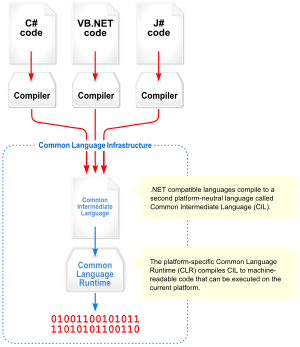
As you can see in the next picture, when you compile your code, it is not compiled directly to machine code, instead it is compiled to a well-know language called Microsoft Intermediate Language (MSIL), this language is very similar to the Assembly language what maked it easier for the JIT than normal C# or VB.NET codes.
Question : So, you say that the .NET does not compile to native language? so how would the CPU understand it?
The answer is quite simple, when you run your program, the CLR calls for the JIT (Just-In-Time) that will compile your MSIL code to native assembly code! This may slow your program a little bit but you can get rid of this by generating a native code using the Ngen tool in the production enviromment (Will be discuss later) , You will get a faster application but you may not! You can just make your application slower because the JIT makes performance optimizations for your code, and also, by using the Ngen tool, you will probably compile some code the current end-user will never use! So the best thing to do is to keep the JIT alive!

The CLS:


The CLS is a set of basic language features to allow all CLI (The CLR in .NET Implementation) Languages to interoperate with each others.
We can say that this is a “set of rules” that a languages should respect to be a valid .NET Language.

The CIL:


You’ve certainly see the MSIL above, what is that? And what does it serve?

The CIl is the lowest-level human-readable programming language defined by the Common Language Infrastructure, and all CLI Languages MSUT compile to it.

MSIL is the Microsoft implementation of the CLI, other framework implementations may name the CLI in an other way, although the runtime engine is described by an ECMA/ISO specification.

So, when compiling to MSIL you allow your .NET code written in deffirent languages to interoperate with each others more easly.

The Base Class Library:


One of the most important things in the .NET Framework is it’s very huge Class Library that provides you with every thing you need: UI Controls, Data Access, file reading and writing …etc It is much larger in scope than standard libraries for most other languages including C++ and Delphi.

Introduction to .NET

Let’s start by quoting from wikipedia: “The .NET Framework (pronounced dot net) is a software framework for Microsoft Windows operating systems. It includes a large library, and it supports several programming languages which allows language interoperability (each language can use code written in other languages). The .NET library is available to all the programming languages that .NET supports.”
Our definition: .NET Framework is a great developing plateform that allows you to do everything you want the way you want!

Question : I use PHP, why should I change?
The answer is pretty simple: PHP allows you to build websites only, but with the .NET you can build Websites, Windows, Linux, Mac,Windows Phone, iOS, Android Apps, and websites, you can also build SilverLight/WPF Apps! all this with one language! awesome no?
You can even query databases with your language!


Next, the .NET Framework languages are managed, that means you don’t have to worry about unloading variables or about crashing the system, the GC will do every thing for you! It will unload everything unnecessary from the memory without your intervention! And with the JIT you will compile only what you need when you need, it is not necessary any more to compile your entire code when you are going to use only one method! The JIT will compile your MSIL code to Machine code when and only when you need it to provide you a better performance.

This is not what the .NET Framework offer, no, this is only a small part of it’s features, this framework offers a very huge Base Class Library that provide you all what you need, from the user interface to the data access, one important thing about the data access, if you are not familliar with databases and SQL Syntax don’t worry! The new Entity Framework allows you to treat Databases’ tables as objects! something you are familliar with! And the LINQ (Language INtegrated Query) allows you to query your database within your code with your .NET programming language! Wether your querying a XML File, a SQL Server Database, Oracle Database, MySQL Database.. You will use one unified querying suntax!

After building your first app using this framework, you will be surprised : “Wow! How was that easy!” either you are new to the developement or you are comming from another platform or language (PHP, Java, VB6 …etc).

With the .NET Framework, building apps was never easier!